AcuraLink App Guide: Remote Start, Vehicle Status, and Alerts
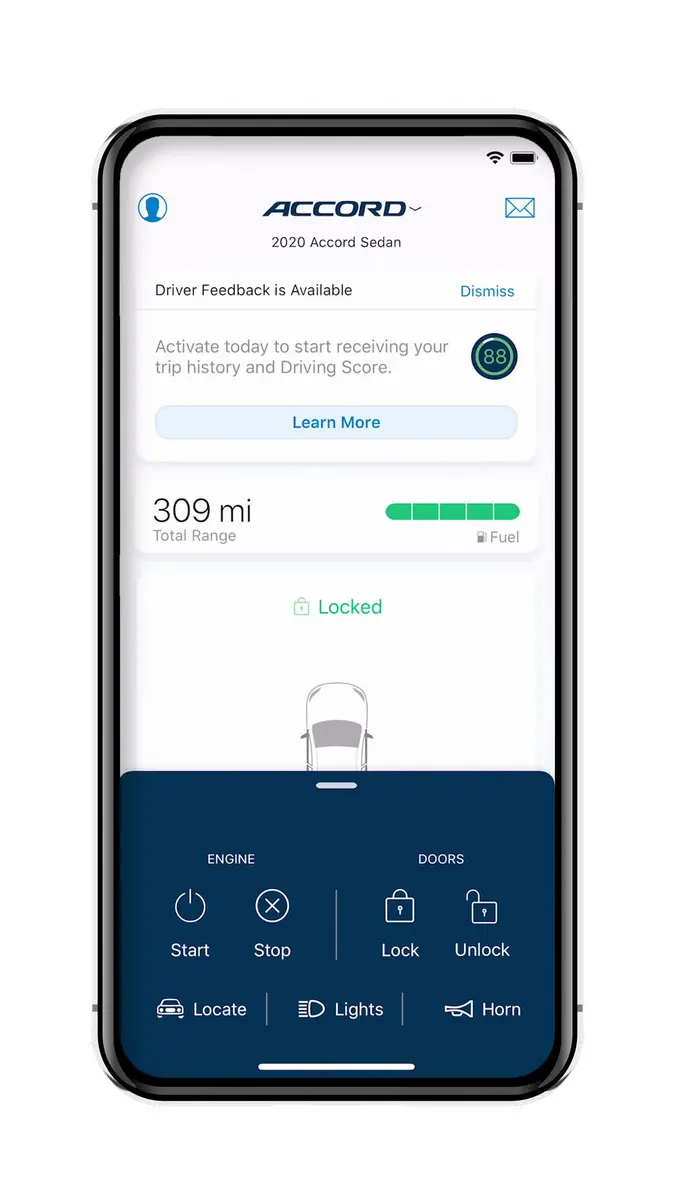
AcuraLink helps you stay connected to your vehicle from your phone. Once it is set up, you can check doors, start the engine on a cold morning, find your car in a busy lot, and see simple health info immediately. The goal is to keep everyday tasks easy without adding extra steps. Here is a guide to the features most drivers use and how to make the best use of them.
Getting Started with AcuraLink and Core Features You Will Use
Download the AcuraLink app and create an account with the same email you use for vehicle services. Add your VIN, then follow the prompts to verify ownership inside the vehicle. Keep the key inside, park, and follow the on-screen steps so the app and car recognize each other.
Remote start is the most popular feature. Open the app, confirm the vehicle is locked, and tap start. The climate system can warm or cool the cabin before you leave. You can also lock or unlock from the app, which is helpful when you forget whether you clicked the fob. Vehicle status shows fuel level, range, and tire pressures on many models, so you know if you need a stop before a longer drive. The location card helps you find the car in a large garage. If your navigation supports it, you can send an address from your phone to the vehicle to save time.
If you use Apple or Android devices, enable Face ID or fingerprint sign-in for quick access. Set a secure PIN for remote commands so only you can start or unlock the vehicle.
Notifications, Privacy Settings, and Quick Troubleshooting Tips
Open the settings and choose which alerts you want. Useful choices include door left unlocked, low fuel, tire pressure warnings, and service reminders. You can also enable security alerts if the alarm triggers. For privacy, review location sharing, notification previews, and which devices are authorized. If you sell the vehicle, remove it from your account and sign out on all devices.
If a feature does not respond, check a few basics. Make sure your phone has service, the app is updated, and permissions for Bluetooth, location, and notifications are on. Refresh vehicle status, then try the command again after a few seconds. If you recently changed phones, re-verify your account and VIN. For remote start to work, the vehicle must be in park with doors closed, the hood secure, and adequate fuel or charge.
Get hands-on help with AcuraLink at Acura of Overland Park
We will help set up your account, customize alerts, and show you how to use remote features before you leave. Bring your phone and we will pair it on the spot and give a demonstration of any and all features you’d like.